MODEL EXPLORER / TENSOR SHAPES
From pixels to features
Where does an image become a classifier input?
THE SAME MODEL, ON YOUR MACHINE
Pick up where
the graph leaves off.
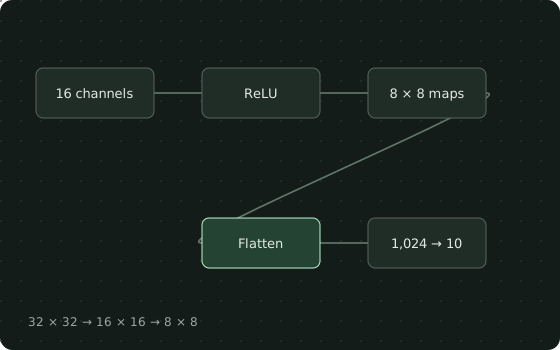
Watch the spatial dimensions shrink, unfold the feature maps, and connect the resulting width to a linear head.
Use in VS Code ↗1. Save these files in one folder
2. Reproduce the example
Use Python 3.13 in a dedicated environment, matching the tested recipe. These commands are for macOS / Linux shells.
python3.13 -m venv .venv
source .venv/bin/activate
python -m pip install -r requirements.txt
python run.py
Expected output: [1,10]
Input: [1,3,32,32] · float32 ones · CPU / eval · seed 0
3. Open the source in TensorViz
Install the preview, open this folder in local VS Code, and choose Open as Graph above SmallCNN in model.py. Select your Python environment. Save before choosing Validate.
Installation and supported setup ↗
The recipe was run with Python 3.13.13 and Torch 2.7.1. This is an untrained example; a successful shape check does not measure accuracy.
ABOUT THIS EXAMPLE
Watch the spatial dimensions shrink, unfold the feature maps, and connect the resulting width to a linear head.
Source, capture & limitations +
An untrained 32 × 32 image classifier. The 1,024-feature head is specific to this input size. Validation covers one CPU forward; it does not measure classification accuracy.
Original TensorViz teaching example. PyTorch provides the underlying operators.
No separate redistribution license has been declared for these project examples.
- Content revision
8b970fa1941344b3- Source SHA-256
72f6cc2f4436625415acf24ab27f94a83bd1cbe6b4977466ac6cea1b0f0ebf83- Captured
- 2026-09-17 · Python 3.13.13 / Torch 2.7.1
One CPU forward with float32 ones; untrained example, no accuracy claim. Installed VS Code workflow not separately verified for this example.
Read the model manifest ↗